When you start your first professional role, you’ll quickly realize that you’re no longer just pushing code to a personal repository. You are part of a team, and that requires a system.
Enter Git Flow. It’s more than just a set of commands; it’s a standard for how we manage the life cycle of a project. As an architect, I’ve seen teams succeed or fail based on how they handle their version control. This guide will help you master the "why" and the "how" of Git Flow.
What is Git Flow?
Git Flow is a branching model originally proposed by Vincent Driessen. It provides a structured framework for managing large projects by defining specific roles for different branches.
Think of it as a traffic management system for your code. It prevents developers from stepping on each other's toes and ensures that the version of the app your users see is always stable.
The Core Branches
In a Git Flow architecture, we move away from just having a main branch. We categorize branches into two main groups: Permanent and Supporting.
The Permanent Branches
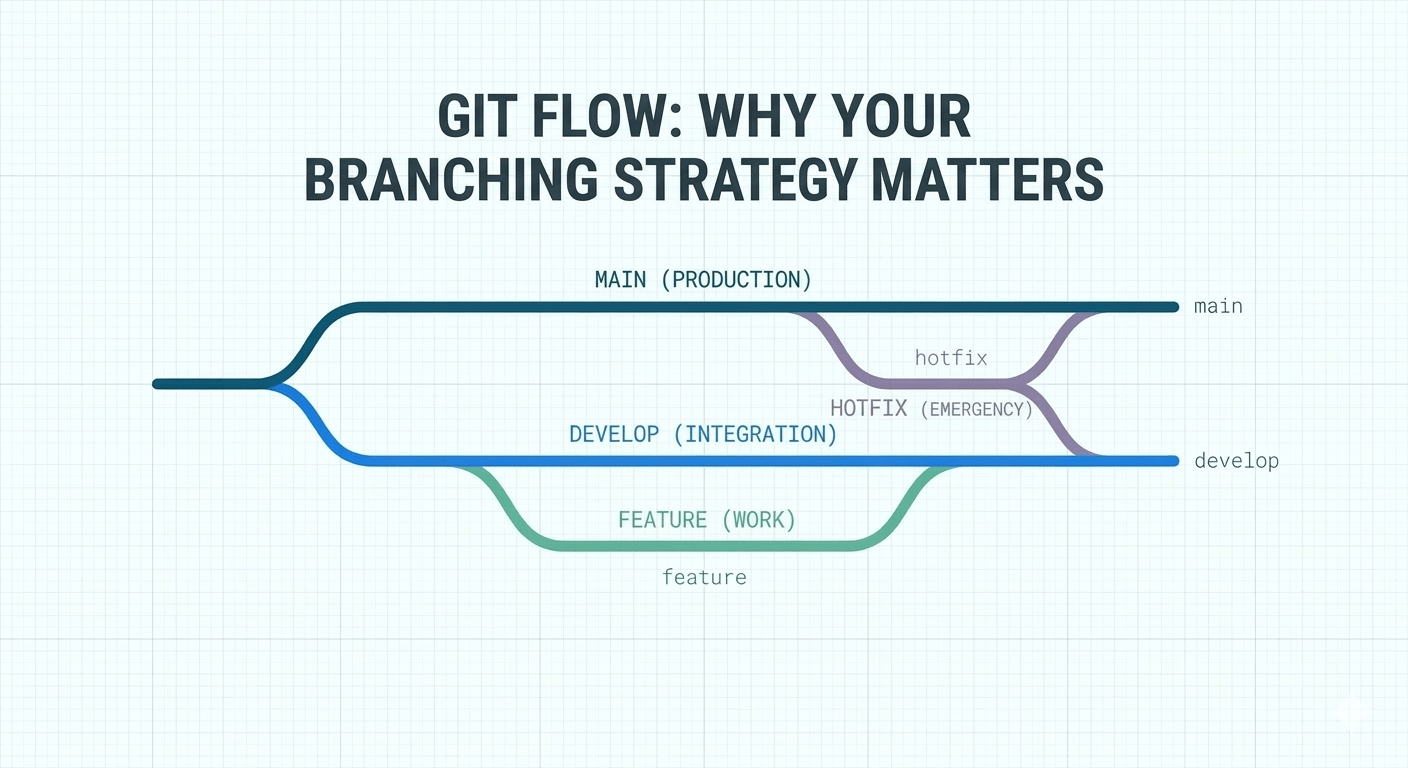
main(ormaster): This is the "Holy Grail." It contains the official release history. Code here is always production-ready, stable, and tested.develop: This is the "Integration" branch. All finished features are merged here. It’s the staging ground for the next release.
The Supporting Branches
feature/*: This is where you will spend 90% of your time. Every new task starts here.release/*: Whendevelophas enough features for a launch, we create a release branch for final polishing and bug fixes.hotfix/*: These are emergency branches. If a critical bug is found in production (main), we branch offmainto fix it immediately, then merge it back to bothmainanddevelop.
Why Should You Follow These Principles?
You might ask, "Why can't I just push to main?" Here is why Git Flow is essential for professional engineering:
Parallel Development: Multiple developers can work on different features without breaking the "main" line.
Release Predictability: It separates "work in progress" from "ready for customers."
Emergency Readiness: Hotfix branches allow you to fix urgent production bugs without waiting for the next feature release to be finished.
Traceability: It creates a clear history of when features were added and when versions were shipped.
Best Practices
As you begin using Git Flow, keep these architectural "rules of thumb" in mind:
Atomic Commits: Don't bundle five different fixes into one commit. Make small, logical commits with clear messages.
Keep Features Small: If a feature branch takes three weeks to finish, it’s too big. Break it down into smaller sub-features.
Pull Frequently: Before you start work, pull the latest changes from
developinto yourfeaturebranch to avoid massive merge conflicts later.Never Delete History: Use
git mergeto bring features into develop. Avoid forced pushes (--force) unless you are absolutely sure of what you are doing.
Starting a Project: Recommendations
If you are setting up a new repository or joining a new team, follow this roadmap:
Initialize the Flow: Use
git flow initto set up the naming conventions.Protect the Main Branch: Use settings in GitHub/GitLab to prevent anyone from pushing directly to
main.
Require a Pull Request (PR) instead.Establish PR Etiquette: As a developer, use PRs as a learning tool. Ask questions in your PRs and request reviews from senior architects.
Automate: Set up basic linting (like ESLint) that runs automatically when you try to merge into
develop.
Conclusion
Mastering Git Flow is one of the most significant steps you can take as a developer. It signals a shift in your mindset from someone who just "writes code" to an engineer who "builds systems."
By following these principles, you protect the integrity of the production environment, make collaboration seamless for your teammates, and ensure that your project’s history remains a clear, traceable map of your hard work.
The takeaway for your next project: Don't fear the structure.
While Git Flow might seem like extra steps today, it is the safety net that will save you from catastrophic merge conflicts and production bugs tomorrow. Start small, be consistent with your branching, and remember: A clean repo is the mark of a great architect.