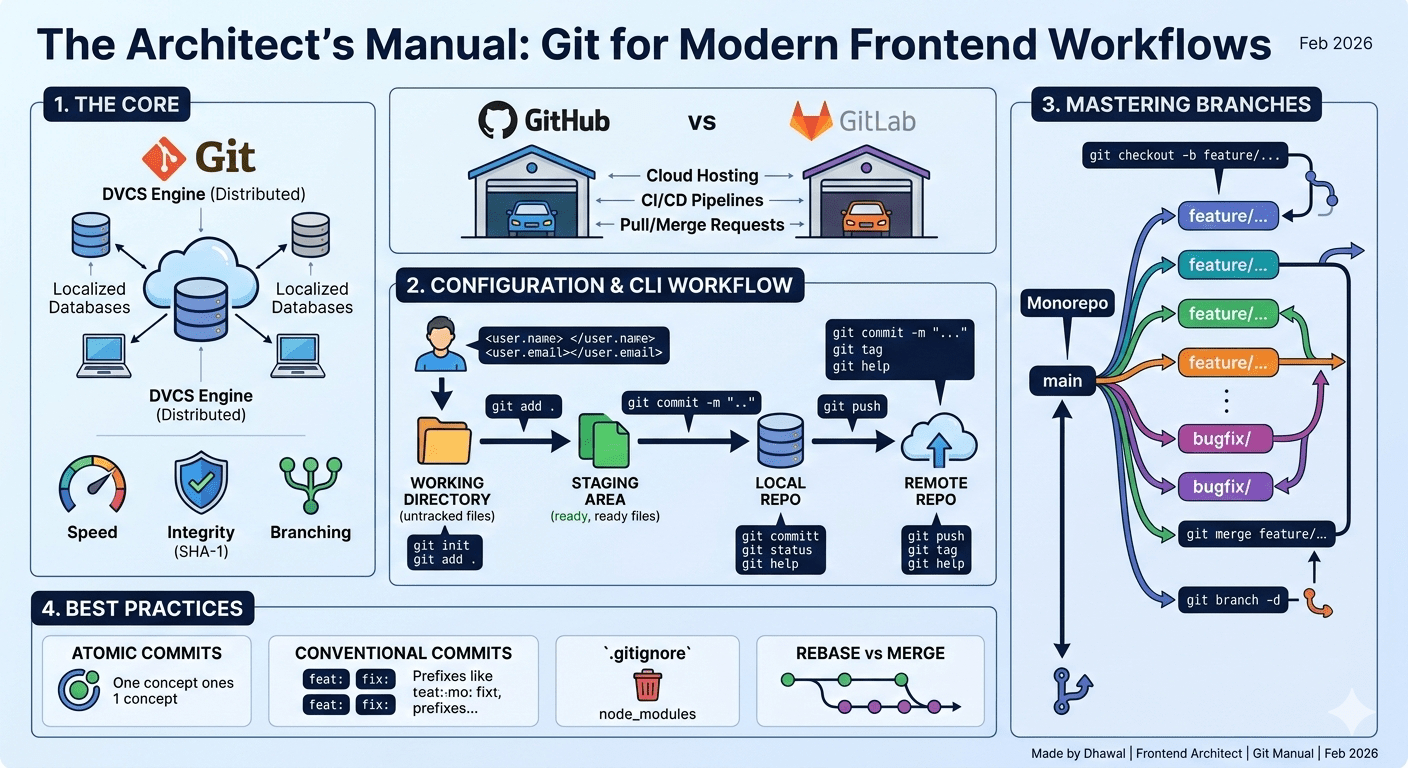
In the era of rapid frontend iteration, version control is more than just a "save button"—it is the nervous system of high-performance teams. This post distills 20 years of architectural experience into a definitive guide, moving from the basic CLI syntax to the high-level strategies (like Trunk-Based Development and Conventional Commits) that separate junior-level coding from senior-level engineering.
The Core Fundamentals
What is Git?
Git is a distributed version control system (VCS) designed to handle everything from small to very large projects with speed and efficiency. Unlike older systems (SVN), every developer has a full copy of the history on their machine.
Why Git?
Speed: Most operations are local, making them near-instant.
Integrity: Everything is checksummed (SHA-1) before being stored.
Branching: Lightweight and nearly free, allowing for experiment-driven development.
What is GitHub or GitLab?
If Git is the engine, GitHub and GitLab are the social garages. They provide:
Cloud Hosting: Centralized storage for your local repos.
CI/CD: Automated testing and deployment pipelines.
Collaboration: Pull Requests (GitHub) or Merge Requests (GitLab) for code reviews.
Configuration & The CLI Workflow
First-Time Configuration
Before your first commit, set your identity:
git config --global user.name "Dhawal"
git config --global user.email "dhawal@example.com"
Essential CLI Operations
- Init: Create a new local repository.
git init - Staging & Adding: Prepare files for a commit.
git add <file_name> # Add specific file git add . # Add all changes - Making a Commit: Record your changes permanently.
git commit -m "feat: implement user authentication component" - Status & Tags: Check your progress or mark milestones.
git status # Current state of working directory git tag -a v1.0.0 -m "Initial Release" - Git Help: Access documentation directly.
git help <command>
Mastering Branches
Branching is where frontend architecture shines, especially for Micro-frontends or Monorepos.
Branching: Create a new "timeline."
git branch feature/new-uiSwitching: Move between branches.
git checkout feature/new-ui
# OR (Modern Git)
git switch feature/new-ui
The Shortcut: Create and switch instantly.
git checkout -b feature/search-apiDeleting: Clean up merged branches.
git branch -d feature/search-apiMerging: Integrating changes.
git checkout main
git merge feature/new-ui
Standard Naming Convention
A professional branch name should follow the pattern:type/ticket-id-description.
| Branch Type | Prefix | Use Case |
| Feature | feature/ | New functionality or UI components (e.g., feature/GS-102-user-auth). |
| Bug Fix | bugfix/ | Resolving issues found during development or QA. |
| Hotfix | hotfix/ | Critical production issues that need to bypass the standard release cycle. |
| Refactor | refactor/ | Code changes that neither fix a bug nor add a feature (e.g., updating a library). |
| Documentation | docs/ | Updates to README, JSDoc, or internal architectural guides. |
Strategic Workflows
Choosing the right strategy depends on your release frequency.
- Feature Branching (The Standard) :
Every task gets its own branch. - The Hotfix Workflow (The Emergency Exit):
Branch directly offmain(or theproductiontag), fix the critical bug, and merge it back into bothmainand currentdevelopbranches. - Bugfix vs. Hotfix
Usually planned or caught during the sprint. It follows the normal flow into the next release.
Conclusion
After two decades in frontend architecture, the most vital lesson I’ve learned is this: Your Git history is the documentation of your intent. Git is far more than a backup system or a way to share code; it is the foundation of a predictable, scalable development lifecycle. By mastering the CLI, enforcing strict naming conventions like feature/, bugfix/, and hotfix/, and prioritizing atomic commits, you aren't just managing files—you are reducing technical debt and enabling your team to move with confidence.