
AEM Content Fragments vs Experience Fragments Explained
Confused about AEM Content Fragments vs Experience Fragments? Compare their features, storage, and delivery.

Told by Kitsu, with Kai asking the questions
Kitsu: One holds the content. The other holds the content and the look. Mix them up, Kai, and every channel pays for it.

If you've worked with Adobe Experience Manager for any length of time, you've hit this fork in the road: you need to reuse some content, and AEM offers two things that sound almost identical — Content Fragments and Experience Fragments.
Content Fragments and Experience Fragments are both reusable, both live in AEM, and both get called "fragments". That's where the similarity ends. The real difference is one question: does this content carry its own design?
Get the answer wrong and you meet the Shifting Oni: content locked into a shape that only fits one place, rebuilt by hand every time a new channel asks for it.
The Shifting Oni appears
Marketing wants a product promo: a title, a price, a short description and an image. It has to show on the website's home page, inside the mobile app, and on in-store screens.

KaiEasy. I'll build it as an Experience Fragment. Those are reusable, right?
The website loves it. Then the app team calls the endpoint and gets back HTML: wrapper divs, grid classes and a teaser component they can't use. The in-store screens need a different layout entirely. So someone copies the text into a second fragment, then a third. A week later the price changes, and only one of the three gets updated.
KitsuYou gave the content a fixed shape, then asked it to be three shapes at once. That's not my kind of shapeshifting.
Content Fragments: structured content, no design
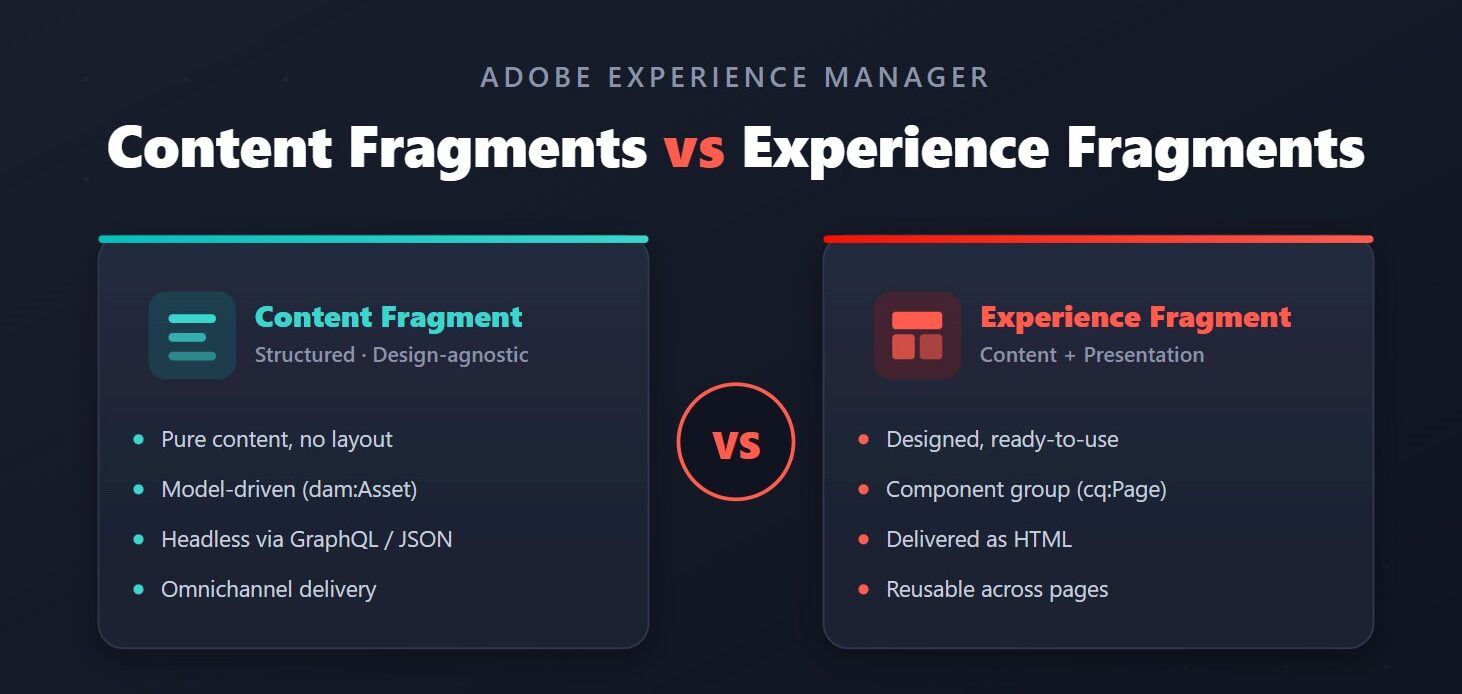
A Content Fragment is pure, structured content. It has fields, not layout. Its structure comes from a Content Fragment Model, where you define fields such as text, numbers, dates, booleans, enumerations, and references to images or other fragments.
- Stored as: assets in the DAM (
/content/dam/…, node typedam:Asset). - Structure defined by: a Content Fragment Model, configured per project.
- Delivered as: JSON, usually through the AEM GraphQL API with persisted queries, or rendered on a page with the Content Fragment core component.
- Variations: alternative versions of the content itself, such as a shorter summary for a small screen.
For the promo, a Product model gives you one fragment that every channel can read. The app fetches only the fields it needs:
query ProductByPath($path: String!) {
productByPath(_path: $path) {
item {
title
price
description {
plaintext
}
image {
... on ImageRef {
_dynamicUrl
}
}
}
}
}
Saved as a persisted query, it becomes a cacheable GET request the app, the website and the in-store screens can all call:
GET /graphql/execute.json/my-project/product-by-path;path=/content/dam/my-project/products/trail-shoe
Each channel decides how the promo looks. The content is written once, and the price changes in one place.
Experience Fragments: content and presentation together
An Experience Fragment is a group of AEM components with their layout and styling, built once and reused across pages. It's a small, designed piece of a page: what you see is exactly what gets reused.
- Stored as: pages under
/content/experience-fragments/…(node typecq:Page). - Structure defined by: editable templates and their allowed components.
- Delivered as: HTML, placed on pages with the Experience Fragment core component. A plain HTML rendition is also available for other systems, and fragments can be exported to Adobe Target as offers.
- Variations: alternative versions of the whole designed section, such as a web version and a social version, or one per language with live copies.
/content/experience-fragments/my-site/en/site/header/master.plain.html
Headers, footers, campaign banners and promo strips are perfect here. Authors edit the section once, visually, and every page that uses it updates.
KaiSo an Experience Fragment isn't wrong. I just used it for content that needed to leave the website.
Side-by-side comparsion
| Content Fragment | Experience Fragment | |
| Focus | Content only | Content + presentation |
| Design/layout | None; each channel decides | Built in, using components |
| Stored as | Asset (dam:Asset) | Page (cq:Page) |
| Structure from | Content Fragment Model | Editable template |
| Primary delivery | JSON (GraphQL, persisted queries) | HTML (core component, plain rendition) |
| Best for | Headless and omnichannel: products, articles, FAQs, bios | Reusable page sections: headers, footers, banners, promos |
How to choose in 10 seconds
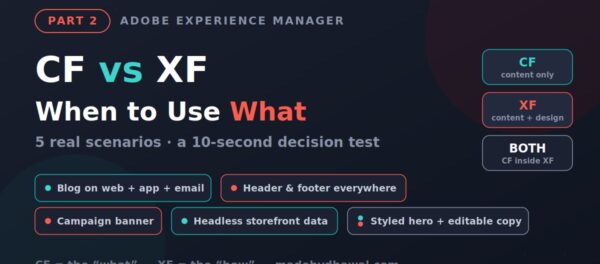
- Will this content appear outside AEM pages, in an app, a single-page app, a screen or another system? Use a Content Fragment.
- Will the same content need different layouts in different places? Use a Content Fragment.
- Is it a designed section that should look identical everywhere it's used on your site? Use an Experience Fragment.
- Need both? Keep the content in a Content Fragment and place it inside an Experience Fragment with the Content Fragment component. The section is designed once, and the content still stays reusable everywhere else.
KitsuThat last one is my favourite trick. The content stays one shape underneath, and I change the costume on top.
For the promo, the fix was simple: one Product Content Fragment for the facts, read by the app and the in-store screens as JSON, and a small Experience Fragment for the website banner that displays it. The price now changes once, everywhere.

KaiOne source of truth, three different looks. The Oni can stop shifting.
Acharya's RuleSeparate what it says from how it looks. If content must travel, make it a Content Fragment. If a designed section must repeat, make it an Experience Fragment.

Frequently asked questions
What is the main difference between Content Fragments and Experience Fragments in AEM?
Content Fragments hold structured content with no design, defined by a Content Fragment Model and delivered as JSON. Experience Fragments hold components together with their layout and styling, and are delivered as HTML.
Can I use a Content Fragment inside an Experience Fragment?
Yes. Add the Content Fragment core component to the Experience Fragment. The section is designed once, while the content stays in a Content Fragment that other channels can still read as JSON.
Which should I use for headless or mobile app content?
Content Fragments. They are designed for headless delivery through the AEM GraphQL API, and persisted queries make the responses cacheable GET requests.
Where are Content Fragments and Experience Fragments stored?
Content Fragments are assets in the DAM (dam:Asset under /content/dam). Experience Fragments are pages (cq:Page under /content/experience-fragments).